AI Chat
Ask questions and evaluate AI-generated answers.
Purpose
AI Chat answers questions using approved organizational knowledge. Answers may include verified sources and code-formatted content.
Start a conversation
- Select AI Chat from navigation.
- Select New Conversation when you want a clean context.
- Enter a focused question in Type your message.
- Add useful context: department, policy, document, date range, or output format.
- Press Enter or select the send icon.
- Read the answer and inspect its cited sources before acting on it.
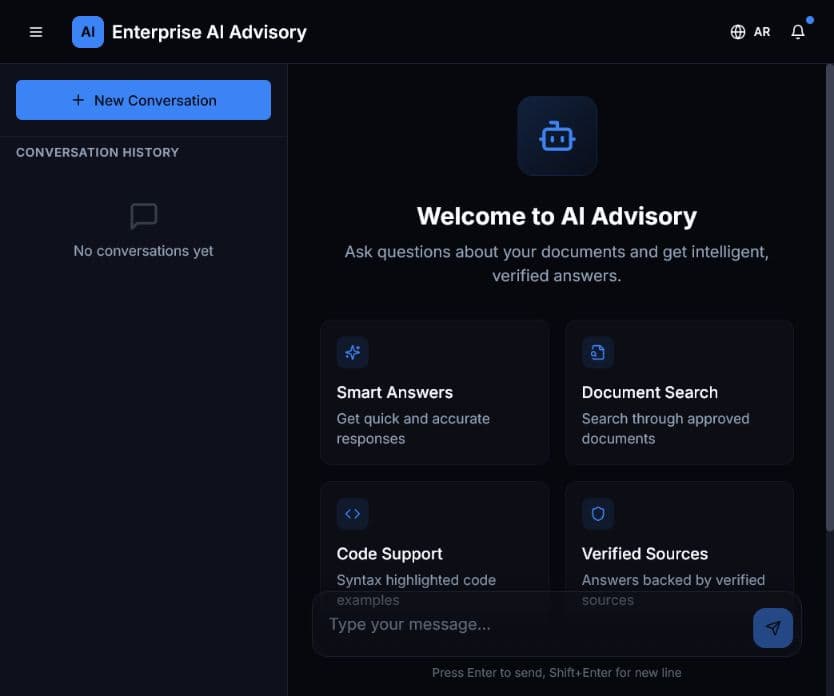
Expected result: The response appears in the conversation area and the conversation becomes available in history.
Example questions
- “Summarize the approved anti-money-laundering controls as a five-step checklist.”
- “Which document defines the approval requirement for this process?”
- “Compare the two policies and list only material differences.”
Good practice
- Ask one main question at a time.
- Use a new conversation when changing topics.
- Do not include secrets or personal information unless explicitly approved.
- Treat uncited or unclear statements as unverified.
- If the answer is weak, clarify the question or confirm that the relevant document is active and approved.