Audit Logs
Search and review recorded application activity.
Purpose and access
Audit Logs record authentication, document, administrative, and other system events. Access should be limited to authorized operational, security, and compliance personnel.
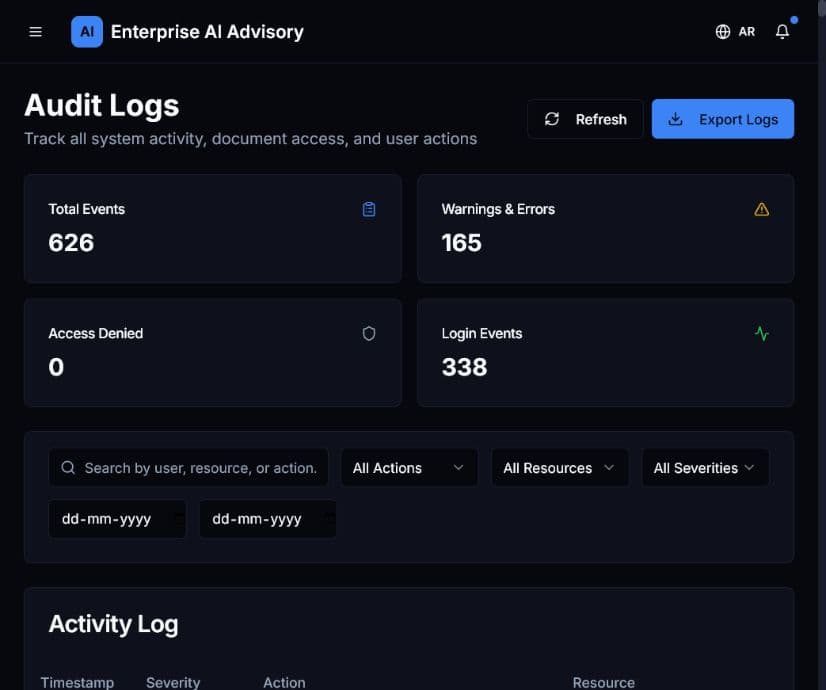
Investigate activity
- Open Audit Logs and allow the activity table to finish loading.
- Review the summary counters for total events, warnings and errors, access denials, and logins.
- Search by user, resource, or action.
- Filter by action, resource, severity, or date range.
- Review timestamp, severity, action, resource, user, and target together.
- Open event details when additional context is required.
- Export logs only when authorized and store the file securely.
Expected result: The activity table shows only events matching the selected criteria.
An error event is a signal to investigate, not automatic proof of malicious activity. Correlate it with user context and related events.