Document Management
Find and administer documents used by AI Advisory.
Purpose and access
The Documents page stores the approved material used for retrieval-based answers. Viewing may be broadly available; uploading, approval, activation, and removal require elevated permissions.
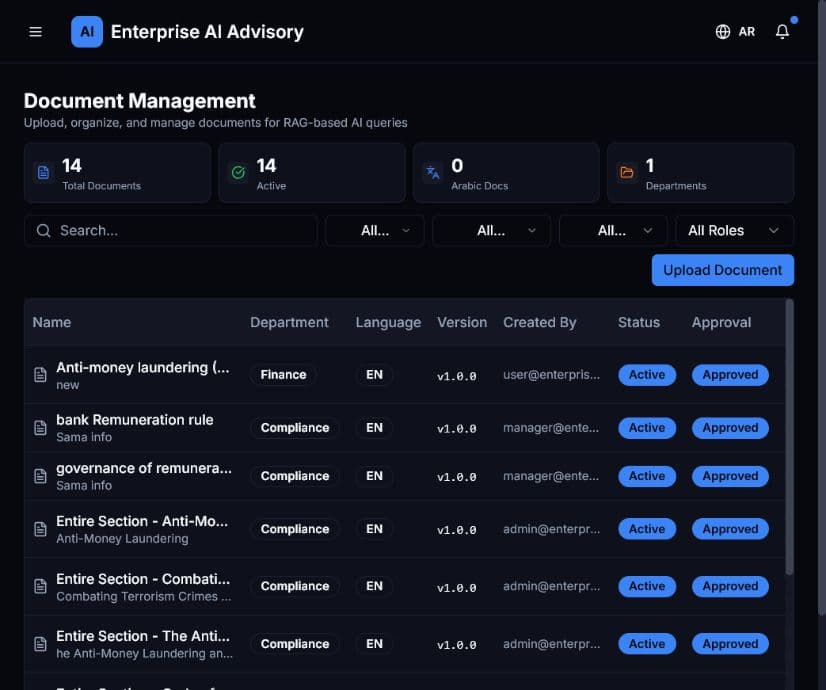
Find a document
- Open Documents.
- Enter part of the document name in Search.
- Narrow the list with status, department, language, or role filters.
- Review the document name, version, owner, status, and approval state.
Upload a document
- Confirm that you are authorized to upload the content.
- Select Upload Document.
- Choose the approved file and provide the required metadata.
- Assign the correct department, language, and access scope.
- Review the information before submission.
- Complete the organization’s approval process before making the document active.
Expected result: The document appears in the list with its processing, approval, or active status.
Replacing a policy without reviewing its version and access scope can change AI answers. Keep the previous version according to your retention policy.